.svg)
Time back, without giving up control or privacy
Amplify AI turns hours of IEP writing into minutes of review. Here is what that's built on, and the questions we hear most.
What Amplify AI stands on
Time reduction
75% less admin time. 3x faster lesson planning. A plan that took two hours takes minutes. No corners are cut, and teachers get the time back to spend with students.
The teacher stays the author
The AI drafts the plan. You review, edit, and finalize it. Every goal and accommodation is approved by the teacher who knows the student. Nothing goes out under your name without you seeing it first.
Purpose-built
Built as an education tool, not a general AI pointed at schools. Aligned to BC Educational Standards and developed alongside SCSBC's Director of Inclusive Education.
Most teachers write their first plan the same day they start
There is no training program to schedule and no system to migrate. You answer a few questions or paste in the notes you already have, and the draft comes back. Short training videos are there if you want them, and we will run a session with your staff if you would rather be walked through it.

The pillars in action, not just on a page
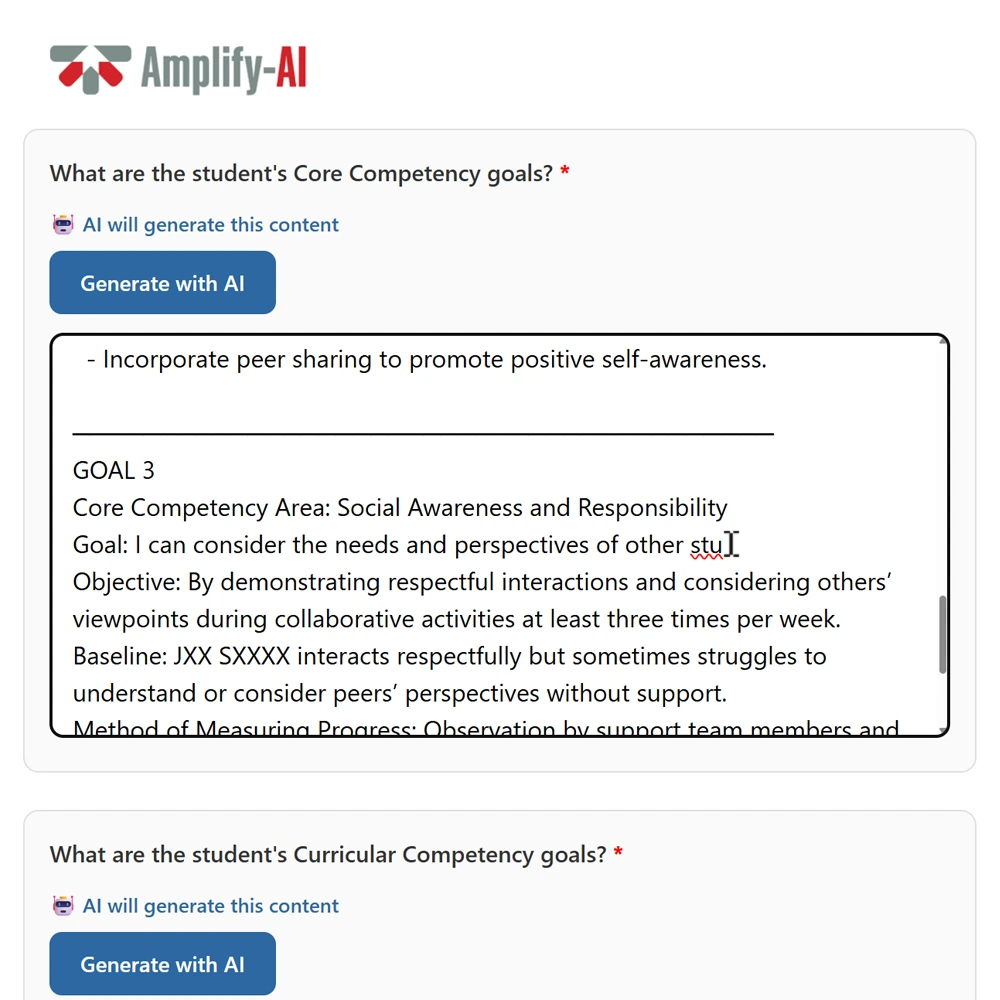
Reading about time reduction and teacher control is one thing. Watching a real IEP take shape, start to finish, is what actually settles it for most people.
A full plan generated from a sample student profile
Every step visible, nothing happening behind the scenes
The exact review-and-finalize step your teachers will use
Built to give teachers their time back
Less time spent on paperwork
Faster lesson planning
Teacher-approved plans
Watch it happen in real time
A quick recording of Amplify AI turning a few notes into a finished IEP.
Common questions
Amplify AI is a planning tool built for educators that turns hours of writing IEPs and lesson plans into a short, guided review process.
Amplify AI puts together a first draft based on what you input. You go through it afterward, make any changes, and it's not finished until you say it is. Nothing goes out under your name without you seeing it first.
You answer a set of questions or upload existing notes about the student, and the tool builds the plan from there. The more detail you give it, the closer the first draft lands to what you'd write yourself.
It's built to handle the kind of case-by-case detail real IEPs need, not just generic templates. That said, it's a starting point, not a replacement for your judgment on anything unusual or complex. That's exactly why the review step exists.
Yes. The plan isn't finalized until the teacher reviews it and signs off. Many teachers do this in the same sitting they generate the draft alongside parents and guardians, eliminating the need for a second meeting for IEP review.
It depends on whether your school is an SCSBC member. Non-member pricing is tiered by school size. Get in touch for current pricing.
Yes, it's included at no cost for SCSBC member schools.
Per school. One license covers the whole staff, so there's no per-seat cost to worry about as more teachers start using it.
Yes. You can try Amplify AI free for a full month, and a live demo is available if you'd rather be walked through it first.
Amplify AI's IEP tool works for any independent school in BC, whatever your school's mission or faith background. It was developed alongside SCSBC's Director of Inclusive Education, and it works the same way whether your school is faith-based or secular.
Yes, that's a core part of how it was built, not an add-on.
Right now, the IEP tool (Inclusive Education) is live and available. Two more tools, one for Teaching for Transformation and one for general lesson and course planning, are in development and coming soon.
At this time, Amplify AI is built around the BC Educational Standards. If you are interested in Amplify AI outside of BC, we would love to hear from you. Get in touch so we can learn more about your school.
Amplify AI's application data is hosted in Canada, not the United States. We're happy to walk your IT team through our data practices in more detail.
Most teachers pick it up quickly since the whole point is that it feels like less work, not more software to learn.
Training videos are available to walk your team through it. If you need additional support or specialized training, we're happy to organize a session with you and your staff.
No. The tool drafts, the teacher decides. It's built to hand back the hours lost to paperwork, not to replace the judgment and relationship a teacher brings to a student's plan.
The most effective schools we've seen start with one or two teachers who try it and share their experience directly with colleagues. Peer to peer usually works better than a top-down rollout.
Amplify Your School’s Impact
See how Amplify AI can reduce workload, strengthen teaching practice, and support student learning.
.svg)